
Component Props
Developer Interface
Let's start with props.
Let's think about the final developer interface.
Let's consider that props are passed as the first argument to the setup function.
const MyComponent = {
  props: { message: { type: String } },

  setup(props) {
    return () => h('div', { id: 'my-app' }, [`message: ${props.message}`])
  },
}

const app = createApp({
  setup() {
    const state = reactive({ message: 'hello' })

    const changeMessage = () => {
      state.message += '!'
    }

    return () =>
      h('div', { id: 'my-app' }, [
        h(MyComponent, { message: state.message }, []),
      ])
  },
})
Implementation
Based on this, let's think about the information we want to have in ComponentInternalInstance.
We need the definition of props specified as props: { message: { type: String } }, and a property to actually hold the props value, so we add the following:
export type Data = Record<string, unknown>

export interface ComponentInternalInstance {
  // .
  // .
  // .
  propsOptions: Props // Holds an object like `props: { message: { type: String } }`

  props: Data // Holds the actual data passed from the parent (in this case, it will be something like `{ message: "hello" }`)
}
Create a new file called ~/packages/runtime-core/componentProps.ts with the following content:
export type Props = Record<string, PropOptions | null>

export interface PropOptions<T = any> {
  type?: PropType<T> | true | null
  required?: boolean
  default?: null | undefined | object
}

export type PropType<T> = { new (...args: any[]): T & {} }
Add it to the options when implementing the component.
export type ComponentOptions = {
  props?: Record<string, any> // Added
  setup?: () => Function
  render?: Function
}
When generating an instance with createComponentInstance, set the propsOptions to the instance when generating the instance.
export function createComponentInstance(
  vnode: VNode
): ComponentInternalInstance {
  const type = vnode.type as Component;

  const instance: ComponentInternalInstance = {
    // .
    // .
    // .
    propsOptions: type.props || {},
    props: {},
Let's think about how to form the instance.props.
At the time of component mounting, filter the props held by the vnode based on the propsOptions.
Convert the filtered object into a reactive object using the reactive function, and assign it to instance.props.
Implement a function called initProps in componentProps.ts that performs this series of steps.
export function initProps(
  instance: ComponentInternalInstance,
  rawProps: Data | null,
) {
  const props: Data = {}
  setFullProps(instance, rawProps, props)
  instance.props = reactive(props)
}

function setFullProps(
  instance: ComponentInternalInstance,
  rawProps: Data | null,
  props: Data,
) {
  const options = instance.propsOptions

  if (rawProps) {
    for (let key in rawProps) {
      const value = rawProps[key]
      if (options && options.hasOwnProperty(key)) {
        props[key] = value
      }
    }
  }
}
Actually execute initProps at the time of mounting, and pass props to the setup function as an argument.
const mountComponent = (initialVNode: VNode, container: RendererElement) => {
    const instance: ComponentInternalInstance = (initialVNode.component =
      createComponentInstance(initialVNode));

    // init props
    const { props } = instance.vnode;
    initProps(instance, props);

    const component = initialVNode.type as Component;
    if (component.setup) {
      instance.render = component.setup(
        instance.props // Pass props to setup
      ) as InternalRenderFunction;
    }
    // .
    // .
    // .
}export type ComponentOptions = {
props?: Record<string, any>
setup?: (props: Record<string, any>) => Function // Receive props
render?: Function
}At this point, props should be passed to the child component, so let's check it in the playground.
const MyComponent = {
  props: { message: { type: String } },

  setup(props: { message: string }) {
    return () => h('div', { id: 'my-app' }, [`message: ${props.message}`])
  },
}

const app = createApp({
  setup() {
    const state = reactive({ message: 'hello' })

    return () =>
      h('div', { id: 'my-app' }, [
        h(MyComponent, { message: state.message }, []),
      ])
  },
})
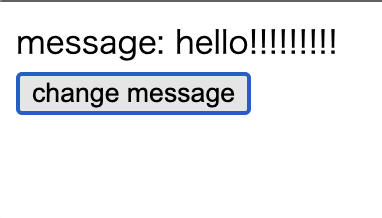
However, this is not enough, as the rendering is not updated when props are changed.
const MyComponent = {
  props: { message: { type: String } },

  setup(props: { message: string }) {
    return () => h('div', { id: 'my-app' }, [`message: ${props.message}`])
  },
}

const app = createApp({
  setup() {
    const state = reactive({ message: 'hello' })
    const changeMessage = () => {
      state.message += '!'
    }

    return () =>
      h('div', { id: 'my-app' }, [
        h(MyComponent, { message: state.message }, []),
        h('button', { onClick: changeMessage }, ['change message']),
      ])
  },
})
To make this component work, we need to implement updateProps in componentProps.ts and execute it when the component updates.
~/packages/runtime-core/componentProps.ts
export function updateProps(
  instance: ComponentInternalInstance,
  rawProps: Data | null,
) {
  const { props } = instance
  Object.assign(props, rawProps)
}
Let's organize the flow of component update processing.
When a parent component re-renders, the props passed to child components may change.
The flow is as follows:
- The parent component's
renderfunction is executed, generating a new VNode for the child component - In the
patchprocess,processComponentis called, comparing the existing component (n1) with the new VNode (n2) - If an existing component exists, the
updateComponentfunction is called
First, add the next property to ComponentInternalInstance.
export interface ComponentInternalInstance {
  // .
  // .
  vnode: VNode // Current VNode
  next: VNode | null // When there's an update request from parent, the new VNode is set here
  // .
  // .
}
Next, implement the update processing for already mounted components in processComponent.
const processComponent = (n1: VNode | null, n2: VNode, container: RendererElement) => {
  if (n1 == null) {
    mountComponent(n2, container);
  } else {
    updateComponent(n1, n2); // Added
  }
};

const updateComponent = (n1: VNode, n2: VNode) => {
  const instance = (n2.component = n1.component)!; // Inherit the instance reference from old VNode to new VNode
  instance.next = n2; // Set the new VNode to next
  instance.update(); // Trigger component update
};
In updateComponent, we set the new VNode (n2) to instance.next and then call instance.update().
This triggers the execution of componentUpdateFn.
~/packages/runtime-core/renderer.ts
const setupRenderEffect = (
    instance: ComponentInternalInstance,
    initialVNode: VNode,
    container: RendererElement
  ) => {
    const componentUpdateFn = () => {
      const { render } = instance;
      if (!instance.isMounted) {
        const subTree = (instance.subTree = normalizeVNode(render()));
        patch(null, subTree, container);
        initialVNode.el = subTree.el;
        instance.isMounted = true;
      } else {
        let { next, vnode } = instance;

        if (next) {
          // When there's an update request from parent (e.g., props changed)
          next.el = vnode.el; // Inherit the current DOM element reference to the new VNode
          next.component = instance; // Set the instance reference to the new VNode
          instance.vnode = next; // Switch the instance's "current VNode" to the new one
          instance.next = null; // Reset to null as it's been processed
          updateProps(instance, next.props); // Update the instance's props with the new props
        }
        // If next doesn't exist, it's a re-render due to changes in the component's own reactive state
When instance.next exists, it means there was an update request from the parent component (such as props changes).
In this case, we reflect the new VNode's information to the instance before updating the props.
When instance.next doesn't exist, it's a re-render due to changes in the component's own internal state (reactive values).
If the screen is updated, it's OK.
Now, you can pass data to the component using props! Great job!
Source code up to this point:
chibivue (GitHub)
As a side note, although it's not necessary, let's implement the ability to receive props in kebab-case, just like in the original Vue.
At this point, create a directory called ~/packages/shared and create a file called general.ts in it.
This is the place to define general functions, not only for runtime-core and runtime-dom.
Following the original Vue, let's implement hasOwn and camelize.
~/packages/shared/general.ts
const hasOwnProperty = Object.prototype.hasOwnProperty
export const hasOwn = (
  val: object,
  key: string | symbol,
): key is keyof typeof val => hasOwnProperty.call(val, key)

const camelizeRE = /-(\w)/g
export const camelize = (str: string): string => {
  return str.replace(camelizeRE, (_, c) => (c ? c.toUpperCase() : ''))
}
Let's use camelize in componentProps.ts.
export function updateProps(
  instance: ComponentInternalInstance,
  rawProps: Data | null,
) {
  const { props } = instance
  // -------------------------------------------------------------- here
  Object.entries(rawProps ?? {}).forEach(([key, value]) => {
    props[camelize(key)] = value
  })
}

function setFullProps(
  instance: ComponentInternalInstance,
  rawProps: Data | null,
  props: Data,
) {
  const options = instance.propsOptions

  if (rawProps) {
    for (let key in rawProps) {
      const value = rawProps[key]
      // -------------------------------------------------------------- here
      // kebab -> camel
      let camelKey
      if (options && hasOwn(options, (camelKey = camelize(key)))) {
        props[camelKey] = value
      }
    }
  }
}
Now you should be able to handle kebab-case as well. Let's check it in the playground.
const MyComponent = {
  props: { someMessage: { type: String } },

  setup(props: { someMessage: string }) {
    return () => h('div', {}, [`someMessage: ${props.someMessage}`])
  },
}

const app = createApp({
  setup() {
    const state = reactive({ message: 'hello' })
    const changeMessage = () => {
      state.message += '!'
    }

    return () =>
      h('div', { id: 'my-app' }, [
        h(MyComponent, { 'some-message': state.message }, []),
        h('button', { onClick: changeMessage }, ['change message']),
      ])
  },
})