
组件 Props
开发者接口
让我们从 props 开始。
让我们思考一下最终的开发者接口。
让我们考虑将 props 作为 setup 函数的第一个参数传递。
const MyComponent = {
  props: { message: { type: String } },

  setup(props) {
    return () => h('div', { id: 'my-app' }, [`message: ${props.message}`])
  },
}

const app = createApp({
  setup() {
    const state = reactive({ message: 'hello' })

    const changeMessage = () => {
      state.message += '!'
    }

    return () =>
      h('div', { id: 'my-app' }, [
        h(MyComponent, { message: state.message }, []),
      ])
  },
})
实现
基于此,让我们思考一下我们想在 ComponentInternalInstance 中拥有的信息。
我们需要指定为 props: { message: { type: String } } 的 props 定义,以及一个实际保存 props 值的属性,所以我们添加以下内容:
export type Data = Record<string, unknown>

export interface ComponentInternalInstance {
  // .
  // .
  // .
  propsOptions: Props // 保存像 `props: { message: { type: String } }` 这样的对象

  props: Data // 保存从父组件传递的实际数据(在这种情况下,它将是像 `{ message: "hello" }` 这样的东西)
}
创建一个名为 ~/packages/runtime-core/componentProps.ts 的新文件,内容如下:
export type Props = Record<string, PropOptions | null>

export interface PropOptions<T = any> {
  type?: PropType<T> | true | null
  required?: boolean
  default?: null | undefined | object
}

export type PropType<T> = { new (...args: any[]): T & {} }
在实现组件时将其添加到选项中。
export type ComponentOptions = {
  props?: Record<string, any> // 添加
  setup?: () => Function
  render?: Function
}
当使用 createComponentInstance 生成实例时,在生成实例时将 propsOptions 设置到实例中。
export function createComponentInstance(
  vnode: VNode
): ComponentInternalInstance {
  const type = vnode.type as Component;

  const instance: ComponentInternalInstance = {
    // .
    // .
    // .
    propsOptions: type.props || {},
    props: {},
让我们思考如何形成 instance.props。
在组件挂载时,根据 propsOptions 过滤 vnode 持有的 props。
使用 reactive 函数将过滤后的对象转换为响应式对象,并将其分配给 instance.props。
在 componentProps.ts 中实现一个名为 initProps 的函数来执行这一系列步骤。
export function initProps(
  instance: ComponentInternalInstance,
  rawProps: Data | null,
) {
  const props: Data = {}
  setFullProps(instance, rawProps, props)
  instance.props = reactive(props)
}

function setFullProps(
  instance: ComponentInternalInstance,
  rawProps: Data | null,
  props: Data,
) {
  const options = instance.propsOptions

  if (rawProps) {
    for (let key in rawProps) {
      const value = rawProps[key]
      if (options && options.hasOwnProperty(key)) {
        props[key] = value
      }
    }
  }
}
在挂载时实际执行 initProps,并将 props 作为参数传递给 setup 函数。
const mountComponent = (initialVNode: VNode, container: RendererElement) => {
    const instance: ComponentInternalInstance = (initialVNode.component =
      createComponentInstance(initialVNode));

    // init props
    const { props } = instance.vnode;
    initProps(instance, props);

    const component = initialVNode.type as Component;
    if (component.setup) {
      instance.render = component.setup(
        instance.props // 将 props 传递给 setup
      ) as InternalRenderFunction;
    }
    // .
    // .
    // .
}export type ComponentOptions = {
props?: Record<string, any>
setup?: (props: Record<string, any>) => Function // 接收 props
render?: Function
}此时,props 应该传递给子组件,所以让我们在游乐场中检查它。
const MyComponent = {
  props: { message: { type: String } },

  setup(props: { message: string }) {
    return () => h('div', { id: 'my-app' }, [`message: ${props.message}`])
  },
}

const app = createApp({
  setup() {
    const state = reactive({ message: 'hello' })

    return () =>
      h('div', { id: 'my-app' }, [
        h(MyComponent, { message: state.message }, []),
      ])
  },
})
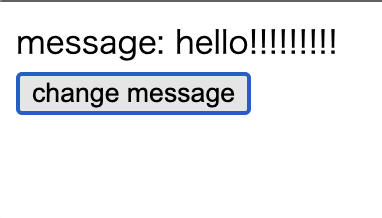
但是,这还不够,因为当 props 更改时渲染不会更新。
const MyComponent = {
  props: { message: { type: String } },

  setup(props: { message: string }) {
    return () => h('div', { id: 'my-app' }, [`message: ${props.message}`])
  },
}

const app = createApp({
  setup() {
    const state = reactive({ message: 'hello' })
    const changeMessage = () => {
      state.message += '!'
    }

    return () =>
      h('div', { id: 'my-app' }, [
        h(MyComponent, { message: state.message }, []),
        h('button', { onClick: changeMessage }, ['change message']),
      ])
  },
})
要使此组件工作,我们需要在 componentProps.ts 中实现 updateProps 并在组件更新时执行它。
~/packages/runtime-core/componentProps.ts
export function updateProps(
  instance: ComponentInternalInstance,
  rawProps: Data | null,
) {
  const { props } = instance
  Object.assign(props, rawProps)
}
让我们整理一下组件更新处理的流程。
当父组件重新渲染时,传递给子组件的 props 可能会改变。
流程如下:
- 父组件的
render函数被执行,为子组件生成新的 VNode - 在
patch处理中,processComponent被调用,比较现有组件(n1)和新的 VNode(n2) - 如果存在现有组件,则调用
updateComponent函数
首先,在 ComponentInternalInstance 中添加 next 属性。
export interface ComponentInternalInstance {
  // .
  // .
  vnode: VNode // 当前的VNode
  next: VNode | null // 当有来自父组件的更新请求时,新的VNode会被设置在这里
  // .
  // .
}
接下来,在 processComponent 中实现已挂载组件的更新处理。
const processComponent = (n1: VNode | null, n2: VNode, container: RendererElement) => {
  if (n1 == null) {
    mountComponent(n2, container);
  } else {
    updateComponent(n1, n2); // 添加
  }
};

const updateComponent = (n1: VNode, n2: VNode) => {
  const instance = (n2.component = n1.component)!; // 将实例引用从旧VNode继承到新VNode
  instance.next = n2; // 将新VNode设置到next
  instance.update(); // 触发组件更新
};
在 updateComponent 中,我们将新的 VNode(n2)设置到 instance.next,然后调用 instance.update()。
这会触发 componentUpdateFn 的执行。
~/packages/runtime-core/renderer.ts
const setupRenderEffect = (
    instance: ComponentInternalInstance,
    initialVNode: VNode,
    container: RendererElement
  ) => {
    const componentUpdateFn = () => {
      const { render } = instance;
      if (!instance.isMounted) {
        const subTree = (instance.subTree = normalizeVNode(render()));
        patch(null, subTree, container);
        initialVNode.el = subTree.el;
        instance.isMounted = true;
      } else {
        let { next, vnode } = instance;

        if (next) {
          // 当有来自父组件的更新请求时(例如,props 改变了)
          next.el = vnode.el; // 将当前DOM元素引用继承到新VNode
          next.component = instance; // 将实例引用设置到新VNode
          instance.vnode = next; // 将实例的"当前VNode"切换为新的
          instance.next = null; // 已处理完毕,重置为null
          updateProps(instance, next.props); // 用新的props更新实例的props
        }
        // 如果next不存在,则是由于组件自身响应式状态变化而导致的重新渲染
当 instance.next 存在时,意味着有来自父组件的更新请求(如 props 改变)。
在这种情况下,我们先将新 VNode 的信息反映到实例中,然后再更新 props。
当 instance.next 不存在时,则是由于组件自身内部状态(响应式值)的变化而导致的重新渲染。
如果屏幕更新了,那就没问题。
现在,您可以使用 props 将数据传递给组件!做得很好!
到此为止的源代码: chibivue (GitHub)
作为附注,虽然这不是必需的,但让我们实现接收 kebab-case props 的能力,就像原始 Vue 中一样。
此时,创建一个名为 ~/packages/shared 的目录,并在其中创建一个名为 general.ts 的文件。
这是定义通用函数的地方,不仅适用于 runtime-core 和 runtime-dom。
按照原始 Vue,让我们实现 hasOwn 和 camelize。
~/packages/shared/general.ts
const hasOwnProperty = Object.prototype.hasOwnProperty
export const hasOwn = (
  val: object,
  key: string | symbol,
): key is keyof typeof val => hasOwnProperty.call(val, key)

const camelizeRE = /-(\w)/g
export const camelize = (str: string): string => {
  return str.replace(camelizeRE, (_, c) => (c ? c.toUpperCase() : ''))
}
让我们在 componentProps.ts 中使用 camelize。
export function updateProps(
  instance: ComponentInternalInstance,
  rawProps: Data | null,
) {
  const { props } = instance
  // -------------------------------------------------------------- 这里
  Object.entries(rawProps ?? {}).forEach(([key, value]) => {
    props[camelize(key)] = value
  })
}

function setFullProps(
  instance: ComponentInternalInstance,
  rawProps: Data | null,
  props: Data,
) {
  const options = instance.propsOptions

  if (rawProps) {
    for (let key in rawProps) {
      const value = rawProps[key]
      // -------------------------------------------------------------- 这里
      // kebab -> camel
      let camelKey
      if (options && hasOwn(options, (camelKey = camelize(key)))) {
        props[camelKey] = value
      }
    }
  }
}
现在您应该也能够处理 kebab-case 了。让我们在游乐场中检查它。
const MyComponent = {
  props: { someMessage: { type: String } },

  setup(props: { someMessage: string }) {
    return () => h('div', {}, [`someMessage: ${props.someMessage}`])
  },
}

const app = createApp({
  setup() {
    const state = reactive({ message: 'hello' })
    const changeMessage = () => {
      state.message += '!'
    }

    return () =>
      h('div', { id: 'my-app' }, [
        h(MyComponent, { 'some-message': state.message }, []),
        h('button', { onClick: changeMessage }, ['change message']),
      ])
  },
})