
套件架構
重構
您可能會想,「嗯?我們只實作了這麼一點,您就想重構?」但這本書的目標之一是「能夠閱讀 Vue.js 原始碼」。
考慮到這一點,我希望始終關注 Vue.js 風格的檔案和目錄結構。所以,請允許我做一點重構...
Vue.js 設計
runtime-core 和 runtime-dom
讓我稍微解釋一下官方 Vue.js 的結構。在這次重構中,我們將建立兩個目錄:「runtime-core」 和 「runtime-dom」。

「程式碼已經能執行了,為什麼還要拆分?」你可能會這樣想。
實際上 Vue.js 被設計成不僅可以在瀏覽器中執行,還可以在 SSR(伺服器端渲染)和原生應用(Vue Native)等環境中執行。
這就是為什麼要將「純邏輯」和「DOM 操作」分離的原因!
為了解釋它們各自是什麼,「runtime-core」 包含 Vue.js 執行期的核心功能。在這個階段,可能很難理解什麼是核心,什麼不是。
所以,我認為透過查看與 「runtime-dom」 的關係會更容易理解。顧名思義,「runtime-dom」 是一個包含相依於 DOM 的實作的目錄。粗略地說,它可以理解為「相依於瀏覽器的操作」。它包括 DOM 操作,如 querySelector 和 createElement。
在 runtime-core 中,我們不編寫這樣的操作,而是設計它在純 TypeScript 的世界中描述 Vue.js 執行期的核心邏輯。例如,它包括與虛擬 DOM 和元件相關的實作。嗯,我認為隨著 chibivue 開發的進展,這會變得更清楚,所以如果您不理解,請暫時按照書中描述的進行重構。
每個檔案的角色和相依關係
我們現在將在 runtime-core 和 runtime-dom 中建立一些檔案。必要的檔案如下:
pwd # ~
mkdir packages/runtime-core
mkdir packages/runtime-dom

## core
touch packages/runtime-core/index.ts
touch packages/runtime-core/apiCreateApp.ts
touch packages/runtime-core/component.ts
touch packages/runtime-core/componentOptions.ts
touch packages/runtime-core/renderer.ts

## dom
touch packages/runtime-dom/index.ts
touch packages/runtime-dom/nodeOps.ts
至於這些檔案的角色,僅僅用文字解釋可能很難理解,所以請參考以下圖表:
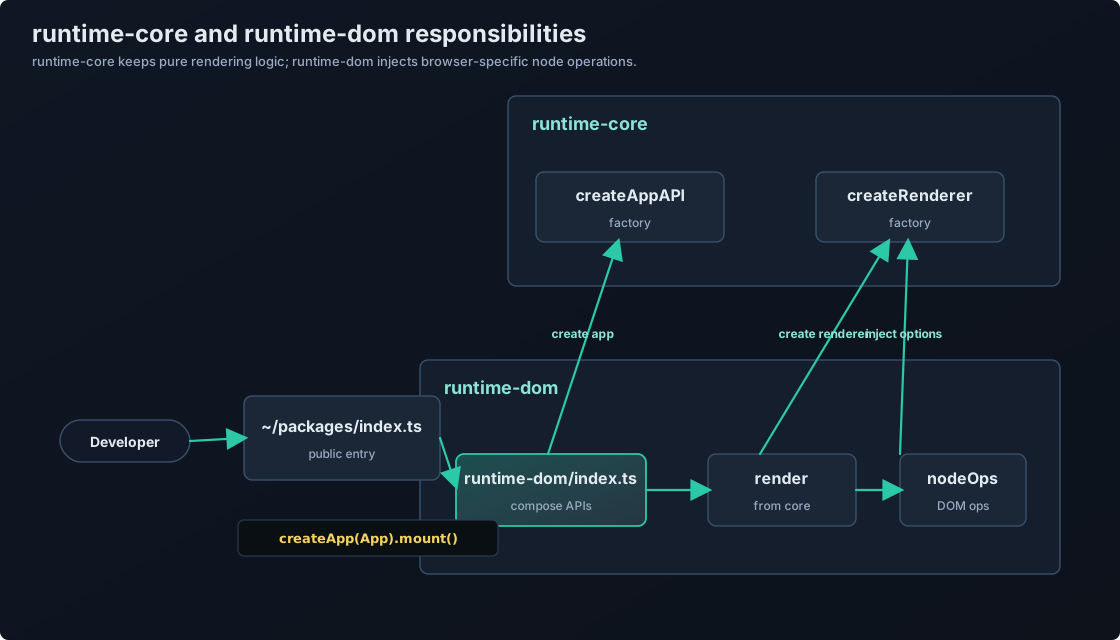
渲染器的設計
如前所述,Vue.js 將相依於 DOM 的部分與 Vue.js 的純核心功能分離。首先,我希望您注意 「runtime-core」 中的渲染器工廠和 「runtime-dom」 中的 nodeOps。在我們之前實作的示例中,我們直接在 createApp 回傳的應用程式的 mount 方法中進行渲染。
// 這是之前的程式碼
export const createApp = (options: Options): App => {
  return {
    mount: selector => {
      const root = document.querySelector(selector)
      if (root) {
        root.innerHTML = options.render() // 渲染
      }
    },
  }
}
此時,程式碼很短,一點也不複雜,所以乍一看似乎很好。然而,當我們將來為虛擬 DOM 編寫補丁渲染邏輯時,它會變得更加複雜。在 Vue.js 中,這個負責渲染的部分被分離為「渲染器」。那就是 「runtime-core/renderer.ts」。說到渲染,很容易想像它相依於在 SPA 中控制瀏覽器 DOM 的 API(document)(建立元素,設定文本等)。因此,為了將這個相依於 DOM 的部分與 Vue.js 的核心渲染邏輯分離,已經做了一些技巧。它是這樣工作的:
- 在
runtime-dom/nodeOps中實作一個用於 DOM 操作的物件。 - 在
runtime-core/renderer中實作一個工廠函式,該函式產生一個只包含渲染邏輯的物件。在這樣做時,確保將處理節點(不限於 DOM)的物件作為參數傳遞給工廠函式。 - 在
runtime-dom/index.ts中使用nodeOps和renderer的工廠來完成渲染器。
這是圖表中用紅色突出顯示的部分。 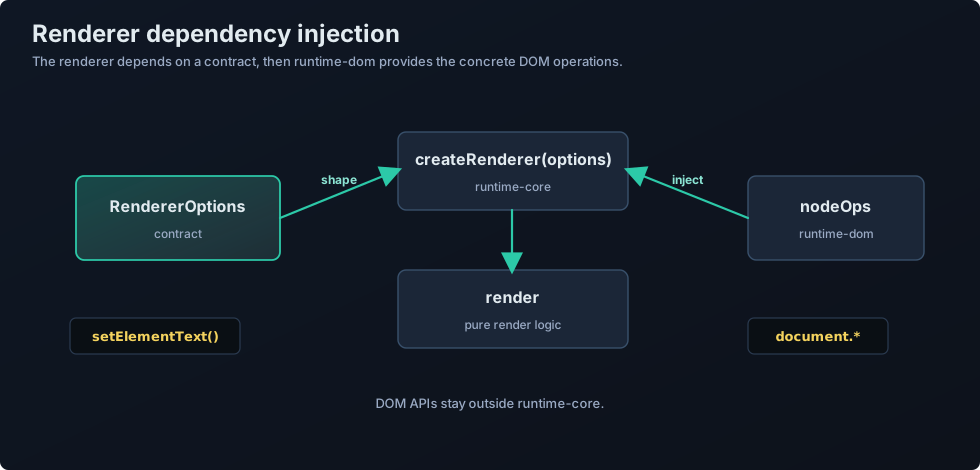
讓我解釋一下原始碼。此時,虛擬 DOM 的渲染功能尚未實作,所以我們將建立與之前相同功能的程式碼。
首先,在 runtime-core/renderer 中實作用於節點(不限於 DOM)操作的物件介面。
export interface RendererOptions<HostNode = RendererNode> {
  setElementText(node: HostNode, text: string): void
}

export interface RendererNode {
  [key: string]: any
}

export interface RendererElement extends RendererNode {}
目前,只有 setElementText 函式,但您可以想像將來會實作 createElement 和 removeChild 等函式。
關於 RendererNode 和 RendererElement,請暫時忽略它們。(這裡的實作只是為成為節點的物件定義一個通用型別,而不相依於 DOM。) 在此檔案中實作渲染器工廠函式,該函式將 RendererOptions 作為參數。
export type RootRenderFunction<HostElement = RendererElement> = (
  message: string,
  container: HostElement,
) => void

export function createRenderer(options: RendererOptions) {
  const { setElementText: hostSetElementText } = options

  const render: RootRenderFunction = (message, container) => {
    hostSetElementText(container, message) // 在這種情況下,我們只是簡單地插入訊息,所以實作是這樣的
  }

  return { render }
}
接下來,在 runtime-dom/nodeOps 中實作 nodeOps。
import { RendererOptions } from '../runtime-core'

export const nodeOps: RendererOptions<Node> = {
  setElementText(node, text) {
    node.textContent = text
  },
}
這裡沒有什麼特別困難的。
現在,讓我們在 runtime-dom/index.ts 中完成渲染器。
import { createRenderer } from '../runtime-core'
import { nodeOps } from './nodeOps'

const { render } = createRenderer(nodeOps)
這樣,渲染器的重構就完成了。
DI 和 DIP
讓我們看看渲染器的設計。總結一下:
- 在
runtime-core/renderer中實作一個工廠函式來產生渲染器。 - 在
runtime-dom/nodeOps中實作一個用於相依於 DOM 的操作(操縱)的物件。 - 在
runtime-dom/index中結合工廠函式和nodeOps來產生渲染器。
這些是「DIP」和「DI」的概念。

DI 和 DIP 是設計模式中比較難理解的概念。
一開始只需要有個大概的印象就可以了!
隨著你寫更多的程式碼,你會恍然大悟:「啊,原來是這樣!」
首先,讓我們談談 DIP(相依倒置原則)。透過實作介面,我們可以倒置相依關係。您應該注意的是在 renderer.ts 中實作的 RendererOptions 介面。工廠函式和 nodeOps 都應該遵守這個 RendererOptions 介面(相依於 RendererOptions 介面)。

如果把 DIP 比作做菜的話...
只要有「食譜(interface)」,無論食材是國產還是進口,都能做出同樣的菜。
渲染器(廚師)只需要按照「RendererOptions(食譜)」來做,不需要關心實際的食材(DOM 操作或其他操作)。
透過使用這個,我們執行 DI。相依注入(DI)是一種透過從外部注入物件所相依的物件來減少相依的技術。在這種情況下,渲染器相依於實作 RendererOptions 的物件(在這種情況下是 nodeOps)。我們不是直接從渲染器實作這種相依,而是將其作為工廠的參數接收。透過使用這些技術,我們確保渲染器不相依於 DOM。
DIP: 相依介面(契約),而不是具體實作
DI: 從外部接收相依(注入它們)
結合這兩者,可以讓程式碼更靈活,更易於測試!
如果您不熟悉 DI 和 DIP,它們可能是困難的概念,但它們是經常使用的重要技術,所以我希望您能夠自己研究和理解它們。
完成 createApp
現在,讓我們回到實作。現在渲染器已經產生,我們需要做的就是考慮以下圖表中的紅色區域。
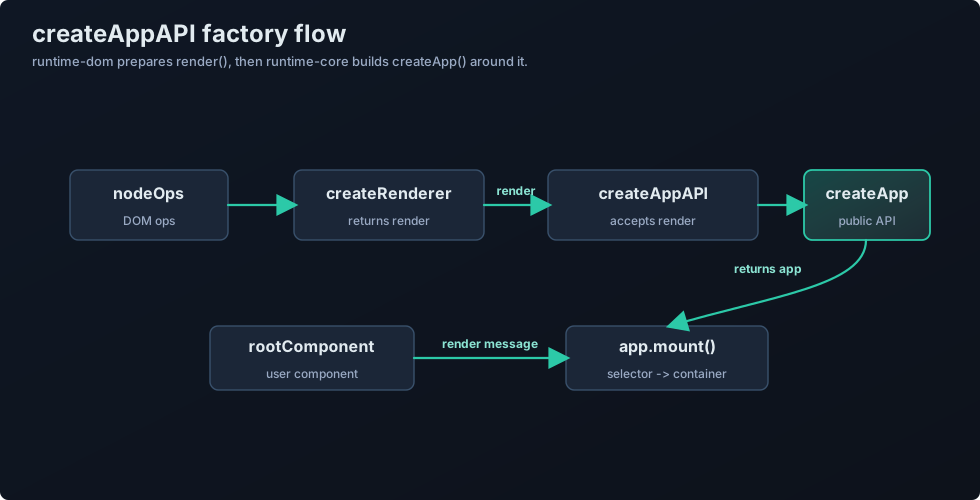
然而,這是一個簡單的任務。我們只需要實作 createApp 的工廠函式,以便它可以接受我們之前建立的渲染器。
// ~/packages/runtime-core apiCreateApp.ts

import { Component } from './component'
import { RootRenderFunction } from './renderer'

export interface App<HostElement = any> {
  mount(rootContainer: HostElement | string): void
}

export type CreateAppFunction<HostElement> = (
  rootComponent: Component,
) => App<HostElement>

export function createAppAPI<HostElement>(
  render: RootRenderFunction<HostElement>,
): CreateAppFunction<HostElement> {
  return function createApp(rootComponent) {
    const app: App = {
      mount(rootContainer: HostElement) {
        const message = rootComponent.render!()
        render(message, rootContainer)
      },
    }

    return app
  }
}// ~/packages/runtime-dom/index.ts
import {
CreateAppFunction,
createAppAPI,
createRenderer,
} from '../runtime-core'
import { nodeOps } from './nodeOps'
const { render } = createRenderer(nodeOps)
const _createApp = createAppAPI(render)
export const createApp = ((...args) => {
const app = _createApp(...args)
const { mount } = app
app.mount = (selector: string) => {
const container = document.querySelector(selector)
if (!container) return
mount(container)
}
return app
}) as CreateAppFunction<Element>我將型別移動到了 ~/packages/runtime-core/component.ts,但這並不重要,所以請參考原始碼(這只是與原始 Vue.js 對齊)。
現在我們更接近原始 Vue.js 的原始碼,讓我們測試一下。如果訊息仍然顯示,那就沒問題。
到此為止的原始碼: chibivue (GitHub)