
讓我們支援事件處理器和屬性

Props 是 properties 的縮寫,也就是傳遞給元素的資訊。事件處理器(如 onClick)和屬性(如 style、class)都會作為 props 處理!
僅僅顯示有點孤單
既然有機會,讓我們實作 props,這樣我們就可以使用點擊事件和樣式。
關於這部分,雖然直接在 renderVNode 中實作也可以,但讓我們嘗試在考慮遵循原始設計的同時進行。
請注意原始 Vue.js 的 runtime-dom 目錄。
https://github.com/vuejs/core/tree/main/packages/runtime-dom/src
我希望您特別注意 modules 目錄和 patchProp.ts 檔案。
在 modules 目錄內,有用於操作類,樣式和其他 props 的檔案。 https://github.com/vuejs/core/tree/main/packages/runtime-dom/src/modules
這些都在 patchProp.ts 中組合成一個名為 patchProp 的函式,並混合到 nodeOps 中。
與其用文字解釋,我將嘗試基於這種設計來做。
建立 patchProps 的框架
首先,讓我們建立框架。
pwd # ~
touch packages/runtime-dom/patchProp.ts
runtime-dom/patchProp.ts 的內容
type DOMRendererOptions = RendererOptions<Node, Element>

const onRE = /^on[^a-z]/
export const isOn = (key: string) => onRE.test(key)

export const patchProp: DOMRendererOptions['patchProp'] = (el, key, value) => {
  if (isOn(key)) {
    // patchEvent(el, key, value); // 我們稍後會實作這個
  } else {
    // patchAttr(el, key, value); // 我們稍後會實作這個
  }
}
由於 patchProp 的型別在 RendererOptions 中沒有定義,讓我們定義它。
export interface RendererOptions<
  HostNode = RendererNode,
  HostElement = RendererElement
> {
  // 加入
  patchProp(el: HostElement, key: string, value: any): void;
  .
  .
  .
這樣,我們需要修改 nodeOps 以排除 patchProps 以外的部分。
// 省略 patchProp
export const nodeOps: Omit<RendererOptions, "patchProp"> = {
  createElement: (tagName) => {
    return document.createElement(tagName);
  },
  .
  .
  .
然後,在 runtime-dom/index 中產生渲染器時,讓我們更改為一起傳遞 patchProp。
const { render } = createRenderer({ ...nodeOps, patchProp })事件處理器
讓我們實作 patchEvent。
pwd # ~
mkdir packages/runtime-dom/modules
touch packages/runtime-dom/modules/events.ts
實作 events.ts。
interface Invoker extends EventListener {
  value: EventValue
}

type EventValue = Function

export function addEventListener(
  el: Element,
  event: string,
  handler: EventListener,
) {
  el.addEventListener(event, handler)
}

export function removeEventListener(
  el: Element,
  event: string,
  handler: EventListener,
) {
  el.removeEventListener(event, handler)
}

export function patchEvent(
  el: Element & { _vei?: Record<string, Invoker | undefined> },
  rawName: string,
  value: EventValue | null,
) {
  // vei = vue event invokers
  const invokers = el._vei || (el._vei = {})
  const existingInvoker = invokers[rawName]

  if (value && existingInvoker) {
    // patch
    existingInvoker.value = value
  } else {
    const name = parseName(rawName)
    if (value) {
      // add
      const invoker = (invokers[rawName] = createInvoker(value))
      addEventListener(el, name, invoker)
    } else if (existingInvoker) {
      // remove
      removeEventListener(el, name, existingInvoker)
      invokers[rawName] = undefined
    }
  }
}

function parseName(rawName: string): string {
  return rawName.slice(2).toLocaleLowerCase()
}

function createInvoker(initialValue: EventValue) {
  const invoker: Invoker = (e: Event) => {
    invoker.value(e)
  }
  invoker.value = initialValue
  return invoker
}
這有點長,但如果您拆分它,這是一個非常簡單的程式碼。
addEventListener 顧名思義,只是一個用於註冊事件監聽器的函式。
雖然實際上需要在適當的時機刪除它,但我們現在將忽略它。
在 patchEvent 中,我們用一個名為 invoker 的函式包裝監聽器並註冊監聽器。
關於 parseName,它只是透過刪除「on」將 prop 鍵名(如 onClick 和 onInput)轉換為小寫(例如 click,input)。 需要注意的一點是,為了不向同一元素加入重複的 addEventListeners,我們將 invoker 加入到名為 _vei(vue event invokers)的元素中。
透過在補丁時更新 existingInvoker.value,我們可以在不加入重複 addEventListeners 的情況下更新處理器。
術語「invoker」簡單地意味著「執行者」。沒有更深的含義;它只是一個儲存將實際執行的處理器的物件。
現在讓我們將其合併到 patchProps 中,並嘗試在 renderVNode 中使用它。
patchProps
export const patchProp: DOMRendererOptions['patchProp'] = (el, key, value) => {
  if (isOn(key)) {
    patchEvent(el, key, value)
  } else {
    // patchAttr(el, key, value); // 我們稍後會實作這個
  }
}
runtime-core/renderer.ts 中的 renderVNode
  const {
    patchProp: hostPatchProp,
    createElement: hostCreateElement,
    createText: hostCreateText,
    insert: hostInsert,
  } = options;
  .
  .
  .
  function renderVNode(vnode: VNode | string) {
    if (typeof vnode === "string") return hostCreateText(vnode);
    const el = hostCreateElement(vnode.type);

    // 這裡
    Object.entries(vnode.props).forEach(([key, value]) => {
      hostPatchProp(el, key, value);
    });
    .
    .
    .
現在讓我們在遊樂場中執行它。我將嘗試顯示一個簡單的警報。
import { createApp, h } from 'chibivue'

const app = createApp({
  render() {
    return h('div', {}, [
      h('p', {}, ['Hello world.']),
      h(
        'button',
        {
          onClick() {
            alert('Hello world!')
          },
        },
        ['click me!'],
      ),
    ])
  },
})

app.mount('#app')
我們現在可以使用 h 函式註冊事件處理器!
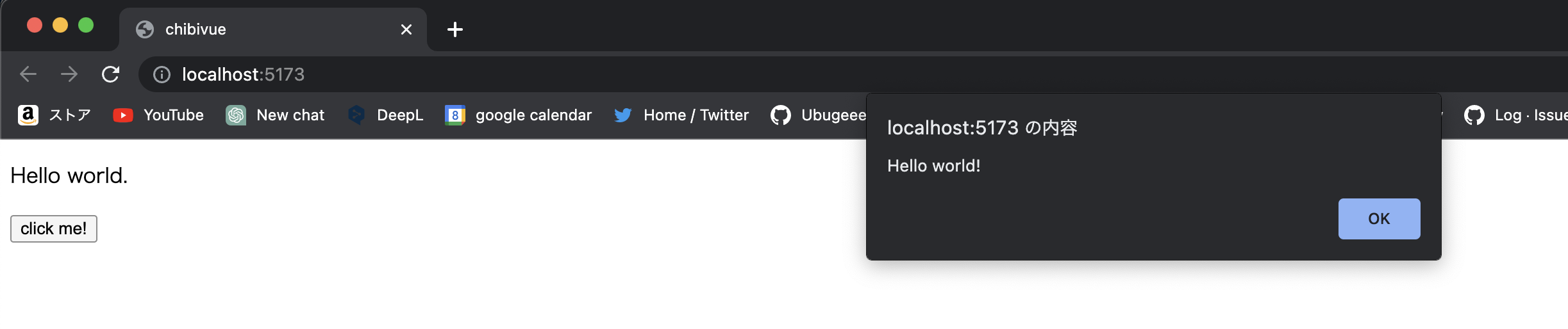

如果直接註冊事件處理器,每次更新都要先移除再加入。用 invoker 包裹後,只需替換其中儲存的值即可!
嘗試支援其他 props
在此之後,只需對 setAttribute 做同樣的事情。
我們將在 modules/attrs.ts 中實作這個。
我希望您自己嘗試。答案將在本章末尾的原始碼中附上,所以請在那裡檢查。
一旦您可以使這段程式碼工作,您就達到了目標。
import { createApp, h } from 'chibivue'

const app = createApp({
  render() {
    return h('div', { id: 'my-app' }, [
      h('p', { style: 'color: red; font-weight: bold;' }, ['Hello world.']),
      h(
        'button',
        {
          onClick() {
            alert('Hello world!')
          },
        },
        ['click me!'],
      ),
    ])
  },
})

app.mount('#app')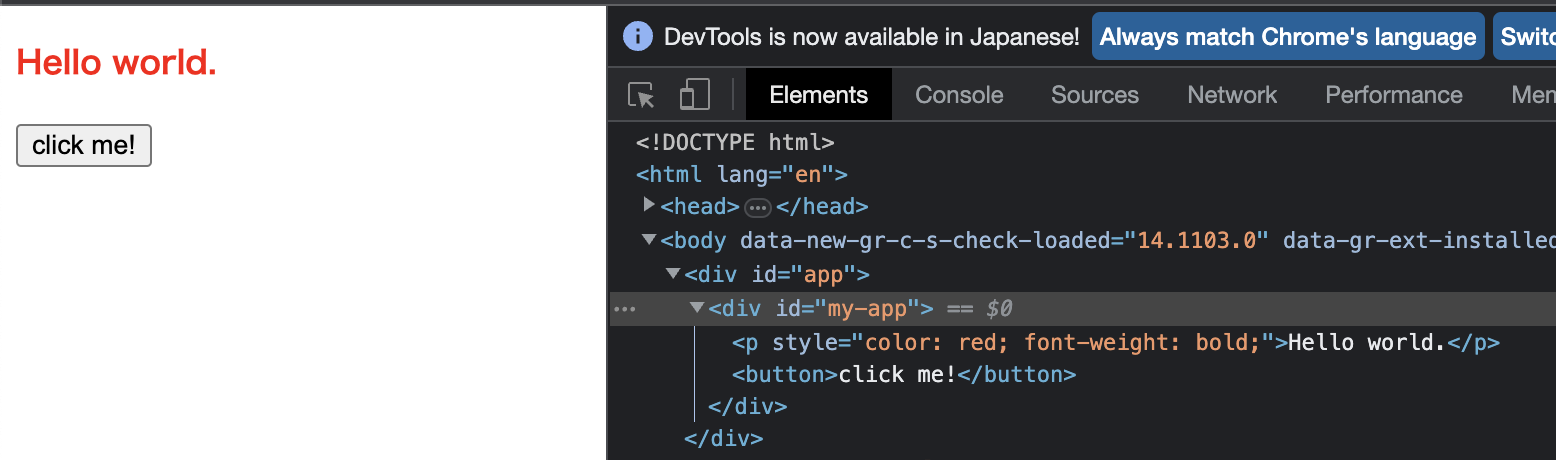

支援事件和屬性後,現在已經可以建立互動式 UI 了!它開始有真正應用程式的感覺了。
現在我們可以處理廣泛的 HTML!
到此為止的原始碼: chibivue (GitHub)