
排程器
調度 Effect
首先,看看這段程式碼:
import { createApp, h, reactive } from 'chibivue'

const app = createApp({
  setup() {
    const state = reactive({
      message: 'Hello World',
    })
    const updateState = () => {
      state.message = 'Hello ChibiVue!'
      state.message = 'Hello ChibiVue!!'
    }

    return () => {
      console.log('😎 rendered!')

      return h('div', { id: 'app' }, [
        h('p', {}, [`message: ${state.message}`]),
        h('button', { onClick: updateState }, ['update']),
      ])
    }
  },
})

app.mount('#app')當按鈕被點擊時,state.message 上的 set 函式被呼叫兩次,所以自然地,trigger 函式也會被執行兩次。這意味著虛擬 DOM 將被計算兩次,補丁也會被執行兩次。

然而,實際上,補丁只需要執行一次,在第二次觸發時。 因此,我們將實作一個排程器。排程器負責管理任務的執行順序和控制。Vue 排程器的作用之一是在佇列中管理響應式 effect,並在可能的情況下合併它們。
使用佇列管理進行調度
具體來說,我們將有一個佇列來管理作業。每個作業都有一個 ID,當新作業入佇列時,如果佇列中已經有相同 ID 的作業,它將被覆蓋。
export interface SchedulerJob extends Function {
  id?: number
}

const queue: SchedulerJob[] = []

export function queueJob(job: SchedulerJob) {
  if (
    !queue.length ||
    !queue.includes(job, isFlushing ? flushIndex + 1 : flushIndex)
  ) {
    if (job.id == null) {
      queue.push(job)
    } else {
      queue.splice(findInsertionIndex(job.id), 0, job)
    }
    queueFlush()
  }
}
至於作業 ID,在這種情況下,我們希望按元件分組,所以我們將為每個元件分配一個唯一識別符(UID)並將其用作作業 ID。 UID 只是透過遞增計數器獲得的識別符。
ReactiveEffect 和排程器
目前,ReactiveEffect 具有以下介面(部分省略):
class ReactiveEffect {
  public fn: () => T,

  run() {}
}
隨著排程器的實作,讓我們做一個小改變。 目前,我們將函式註冊到 fn 作為 effect,但這次,讓我們將其分為"主動執行的 effect"和"被動執行的 effect"。 響應式 effect 可以由設定 effect 的一方主動執行,也可以在被加入到相依項(dep)後被某些外部操作觸發而被動執行。 對於後一種型別的 effect,它被加入到多個 depsMap 並由多個源觸發,需要調度(另一方面,如果它被明確主動呼叫,則不需要這樣的調度)。
讓我們考慮一個具體的例子。在渲染器的 setupRenderEffect 函式中,你可能有以下實作:
const effect = (instance.effect = new ReactiveEffect(() => componentUpdateFn))
const update = (instance.update = () => effect.run())
update()
這裡建立的 effect,它是一個 reactiveEffect,稍後在執行 setup 函式時將被響應式物件追蹤。這顯然需要調度的實作(因為它將從各個地方被觸發)。 然而,關於這裡呼叫的 update() 函式,它應該簡單地執行 effect,所以不需要調度。 你可能會想,"那我們不能直接呼叫 componentUpdateFn 嗎?"但請記住 run 函式的實作。簡單地呼叫 componentUpdateFn 不會設定 activeEffect。 所以,讓我們分離"主動執行的 effect"和"被動執行的 effect(需要調度的 effect)"。
作為本章的最終介面,它將如下所示:
// ReactiveEffect 的第一個參數是主動執行的 effect,第二個參數是被動執行的 effect
const effect = (instance.effect = new ReactiveEffect(componentUpdateFn, () =>
  queueJob(update),
))
const update: SchedulerJob = (instance.update = () => effect.run())
update.id = instance.uid
update()
在實作方面,除了 fn 之外,ReactiveEffect 將有一個 scheduler 函式,在 triggerEffect 函式中,如果存在排程器,將首先執行排程器。
export type EffectScheduler = (...args: any[]) => any;

export class ReactiveEffect<T = any> {
  constructor(
    public fn: () => T,
    public scheduler: EffectScheduler | null = null
  );
}function triggerEffect(effect: ReactiveEffect) {
if (effect.scheduler) {
effect.scheduler()
} else {
effect.run() // 如果沒有排程器,正常執行 effect
}
}現在,讓我們在閱讀原始碼的同時實作佇列管理調度和 effect 分類!
到此為止的原始碼: chibivue (GitHub)
我們需要 nextTick
如果你在實作排程器時閱讀了原始碼,你可能已經注意到"nextTick"的出現並想知道它是否在這裡使用。首先,讓我們談談這次我們想要實作的任務。請看這段程式碼:
import { createApp, h, reactive } from 'chibivue'

const app = createApp({
  setup() {
    const state = reactive({
      count: 0,
    })
    const updateState = () => {
      state.count++

      const p = document.getElementById('count-p')
      if (p) {
        console.log('😎 p.textContent', p.textContent)
      }
    }

    return () => {
      return h('div', { id: 'app' }, [
        h('p', { id: 'count-p' }, [`${state.count}`]),
        h('button', { onClick: updateState }, ['update']),
      ])
    }
  },
})

app.mount('#app')
嘗試點擊這個按鈕並查看主控台。
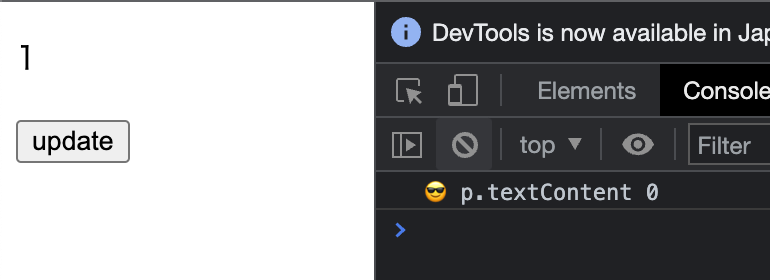
即使我們在更新 state.count 後輸出到主控台,資訊也是過時的。這是因為當狀態更新時,DOM 不會立即更新,在主控台輸出時,DOM 仍處於舊狀態。
這就是"nextTick"發揮作用的地方。
https://vuejs.org/api/general.html#nexttick
"nextTick"是排程器的一個 API,它允許你等待直到排程器應用 DOM 更改。"nextTick"的實作非常簡單。它只是保持排程器中正在刷新的作業(promise)並將其連接到"then"。
export function nextTick<T = void>(
  this: T,
  fn?: (this: T) => void,
): Promise<void> {
  const p = currentFlushPromise || resolvedPromise
  return fn ? p.then(this ? fn.bind(this) : fn) : p
}
當作業完成時(promise 被解析),傳遞給"nextTick"的回呼被執行。(如果佇列中沒有作業,它連接到"resolvedPromise"的"then")自然地,"nextTick"本身也回傳一個 Promise,所以作為開發者介面,你可以傳遞回呼或 await "nextTick"。
import { createApp, h, reactive, nextTick } from 'chibivue'

const app = createApp({
  setup() {
    const state = reactive({
      count: 0,
    })
    const updateState = async () => {
      state.count++

      await nextTick() // 等待
      const p = document.getElementById('count-p')
      if (p) {
        console.log('😎 p.textContent', p.textContent)
      }
    }

    return () => {
      return h('div', { id: 'app' }, [
        h('p', { id: 'count-p' }, [`${state.count}`]),
        h('button', { onClick: updateState }, ['update']),
      ])
    }
  },
})

app.mount('#app')
現在,讓我們實際重寫目前排程器的實作以保持"currentFlushPromise"並實作"nextTick"!
到此為止的原始碼: chibivue (GitHub)