
編譯模板區塊
切換編譯器
descriptor.script.content 和 descriptor.template.content 包含每個部分的原始碼。
讓我們成功編譯它們。讓我們從模板部分開始。
我們已經有了模板編譯器。
但是,正如你從以下程式碼中看到的,
export const generate = ({
  children,
}: {
  children: TemplateChildNode[]
}): string => {
  return `return function render(_ctx) {
  with (_ctx) {
    const { h } = ChibiVue;
    return ${genNode(children[0])};
  }
}`
}
這假設它將與 Function 建構函式一起使用,所以它在開頭包含 return 語句。
在 SFC 編譯器中,我們只想產生渲染函式,所以讓我們使其能夠透過編譯器選項進行分支。
讓我們使其能夠接收選項作為編譯器的第二個參數,並指定一個名為 isBrowser 的標誌。
當這個變數為 true 時,它輸出假設將在執行時 new 的程式碼,當它為 false 時,它只是產生程式碼。
pwd # ~
touch packages/compiler-core/options.ts
packages/compiler-core/options.ts
export type CompilerOptions = {
  isBrowser?: boolean
}
~/packages/compiler-dom/index.ts
export function compile(template: string, option?: CompilerOptions) {
  const defaultOption: Required<CompilerOptions> = { isBrowser: true }
  if (option) Object.assign(defaultOption, option)
  return baseCompile(template, defaultOption)
}
~/packages/compiler-core/compile.ts
export function baseCompile(
  template: string,
  option: Required<CompilerOptions>,
) {
  const parseResult = baseParse(template.trim())
  const code = generate(parseResult, option)
  return code
}
~/packages/compiler-core/codegen.ts
export const generate = (
  {
    children,
  }: {
    children: TemplateChildNode[]
  },
  option: Required<CompilerOptions>,
): string => {
  return `${option.isBrowser ? 'return ' : ''}function render(_ctx) {
  const { h } = ChibiVue;
  return ${genNode(children[0])};
}`
}
我還加入了匯入語句。我將其更改為將產生的原始碼加入到 output 陣列中。
import type { Plugin } from 'vite'
import { createFilter } from 'vite'
import { parse } from '../../compiler-sfc'
import { compile } from '../../compiler-dom'

export default function vitePluginChibivue(): Plugin {
  const filter = createFilter(/\.vue$/)

  return {
    name: 'vite:chibivue',

    transform(code, id) {
      if (!filter(id)) return

      const outputs = []
      outputs.push("import * as ChibiVue from 'chibivue'\n")

      const { descriptor } = parse(code, { filename: id })
      const templateCode = compile(descriptor.template?.content ?? '', {
        isBrowser: false,
      })
      outputs.push(templateCode)

      outputs.push('\n')
      outputs.push(`export default { render }`)

      return { code: outputs.join('\n') }
    },
  }
}
問題
現在你應該能夠編譯渲染函式了。讓我們在瀏覽器的原始碼中檢查它。
但是,有一個小問題。
當將資料綁定到模板時,我認為你正在使用 with 語句。
但是,由於 Vite 處理 ESM 的性質,它無法處理只在非嚴格模式(sloppy mode)下工作的程式碼,並且無法處理 with 語句。
到目前為止,這還不是問題,因為我只是將包含 with 語句的程式碼(字串)傳遞給 Function 建構函式並在瀏覽器中使其成為函式,但現在它會拋出錯誤。
你應該看到這樣的錯誤:
Strict mode code may not include a with statement
這也在 Vite 官方檔案中作為故障排除提示進行了描述。
Syntax Error / Type Error Occurs (Vite)
作為臨時解決方案,讓我們嘗試在非瀏覽器模式下產生不包含 with 語句的程式碼。
具體來說,對於要綁定的資料,讓我們嘗試透過加入前綴 _ctx. 而不是使用 with 語句來控制它。
由於這是一個臨時解決方案,它不是很嚴格,但我認為它通常會工作。
(正確的解決方案將在後面的章節中實作。)
export const generate = (
  {
    children,
  }: {
    children: TemplateChildNode[]
  },
  option: Required<CompilerOptions>,
): string => {
  // 當 `isBrowser` 為 false 時產生不包含 `with` 語句的程式碼
  return `${option.isBrowser ? 'return ' : ''}function render(_ctx) {
    ${option.isBrowser ? 'with (_ctx) {' : ''}
      const { h } = ChibiVue;
      return ${genNode(children[0], option)};
    ${option.isBrowser ? '}' : ''}
}`
}

// .
// .
// .

const genNode = (
  node: TemplateChildNode,
  option: Required<CompilerOptions>,
): string => {
  switch (node.type) {
    case NodeTypes.ELEMENT:
      return genElement(node, option)
    case NodeTypes.TEXT:
      return genText(node)
    case NodeTypes.INTERPOLATION:
      return genInterpolation(node, option)
    default:
      return ''
  }
}

const genElement = (
  el: ElementNode,
  option: Required<CompilerOptions>,
): string => {
  return `h("${el.tag}", {${el.props
    .map(prop => genProp(prop, option))
    .join(', ')}}, [${el.children.map(it => genNode(it, option)).join(', ')}])`
}

const genProp = (
  prop: AttributeNode | DirectiveNode,
  option: Required<CompilerOptions>,
): string => {
  switch (prop.type) {
    case NodeTypes.ATTRIBUTE:
      return `${prop.name}: "${prop.value?.content}"`
    case NodeTypes.DIRECTIVE: {
      switch (prop.name) {
        case 'on':
          return `${toHandlerKey(prop.arg)}: ${
            option.isBrowser ? '' : '_ctx.' // -------------------- 這裡
          }${prop.exp}`
        default:
          // TODO: 其他指令
          throw new Error(`unexpected directive name. got "${prop.name}"`)
      }
    }
    default:
      throw new Error(`unexpected prop type.`)
  }
}

// .
// .
// .

const genInterpolation = (
  node: InterpolationNode,
  option: Required<CompilerOptions>,
): string => {
  return `${option.isBrowser ? '' : '_ctx.'}${node.content}` // ------------ 這裡
}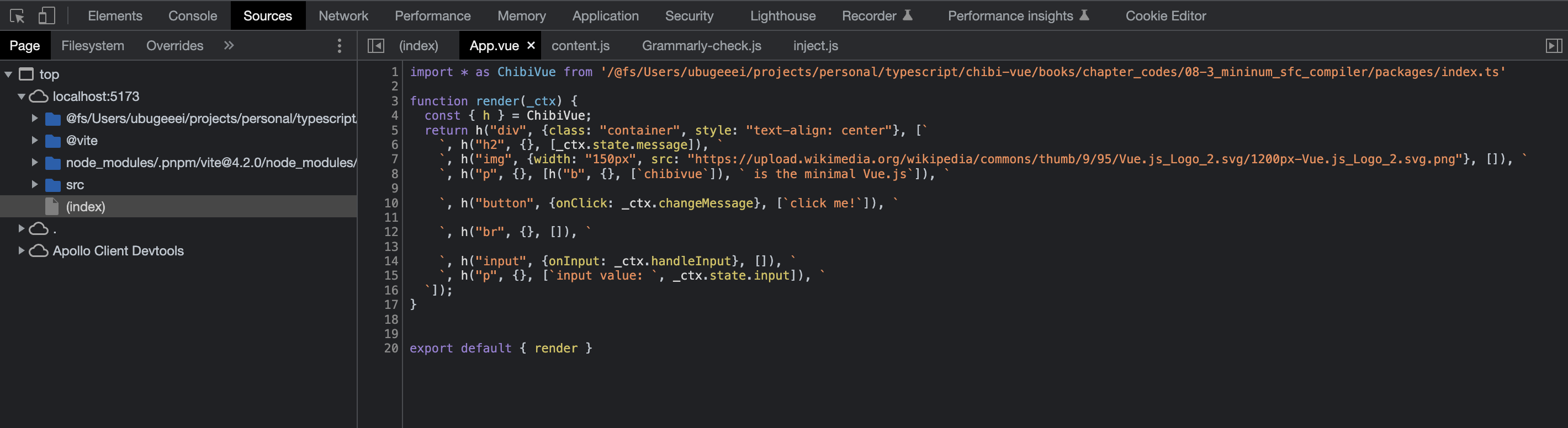
看起來編譯成功了。剩下的就是以同樣的方式提取腳本並將其放入預設匯出中。
到此為止的原始碼: chibivue (GitHub)